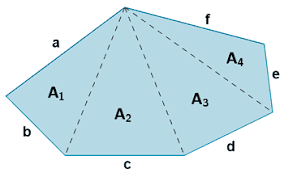
Python y MineSight – Script para calcular Área

import sys
import os
import string
import time
from grail import gsys
from grail import messages
from grail.ms3d import progressmeter
from grail.ms3d import element
from grail.ms3d import mssys
from grail.ms3d import selectionbuffer
from grail.ms3d import elementop
# Re-direct print statements to the MS-3D Message Window
#
sys.stdout = mssys.stdout
def gmain(msg, data):
«»»Main entry point.»»»
if msg == messages.gPRE_RUN:
pass # do any pre-processing prior to running a script.
elif msg == messages.gRUN:
areas() # run your script.
elif msg == messages.gPOST_RUN:
pass # do any post processing on your script.
else:
return gsys.grailmain(msg, data)
def compute_area(el):
«»»Helper function computes areas.»»»
if el.get_type() == element.PolygonType:
return elementop.calc_area(el)
else:
return 0.0
def areas():
«»»Example of using the progressmeter.»»»
if not selectionbuffer.is_selection():
mssys.stderr.write(«No selection!\n»)
return # quit
elementList = selectionbuffer.get_elements()
numElements = len(elementList)
# Start up the progress meter…
pm = progressmeter.ProgressMeter()
pm.start(numElements)
for elementIdx in xrange(numElements):
el = elementList[elementIdx]
area = compute_area(el)
mssys.stdout.write(«%d: %.2f\n» % (elementIdx+1, area))
# In this case we just indicate the new incremental value.
pm.increment(elementIdx)
# In this case we have to specify the percentage in the range
# 0.0 to 1.0 .
#
# percent = float(elementIdx)/float(numElements)
# pm.percent(percent)
# Uncomment this line to add a little delay so you can notice
# the progress meter incrementing.
# time.sleep(.5) # wait for 1/2 a second.
pm.stop()
«»»Added the following print statement for autotests»»»
print «Processing … OK.»

Respuestas